
Best website feedback tools in 2026: 17 compared
A website feedback tool lets reviewers leave comments pinned directly to elements on a live web page, instead of describing problems in an email or a spreadsheet. The tool captures the element, the page and usually a screenshot automatically, turning a vague description into a structured ticket a developer can act on.
Free forever, no card. Clients just open the link, nothing to install.
Quick answer: the best website feedback tool for each job
- Cheapest with console and network capture: Ybug — the cheapest route in the live-site group to full console and network logs, at €29 (€23 billed yearly).
- Client review on sites you cannot deploy to: Layerdock — a hosted link, so no install and no script tag on the client’s site; per-workspace pricing and unlimited reviewers.
- Feedback and a task board in one product: BugHerd — the built-in kanban board and the longest agency track record.
- Teams that live in Jira or Linear: Marker.io — the best two-way issue-tracker sync in the category.
- Solo freelancers: Pastel — the lowest-friction setup: paste a URL, share a link.
- Internal bug reports between developers: Jam.dev — best-in-class recording with console and network data, and a generous free tier.
- Ongoing feedback from a product’s end users: Userback — feature voting, a public roadmap and a usable free tier alongside bug reports.
- PDFs, video and designs as well as websites: MarkUp.io — 30+ reviewable file types and unlimited users on the paid plan.


Key takeaways
- Visual feedback tools (pins on a page) and visitor analytics tools (heatmaps, session recordings) solve different problems. This guide covers the first kind.
- The biggest difference between tools is how much technical context each report carries automatically: screenshot, browser, element, console errors, network requests.
- How a tool reaches the page decides who can use it: widgets need deploy access, extensions need a one-time install, hosted links can break on dynamic sites.
- 8 of the 16 priced tools have a permanent free plan. Client reviewers are free and unlimited on nearly all of them.
- Entry prices mislead: per-seat, per-member and per-workspace billing diverge fast once a whole team needs access.
How this comparison was made
Every price below was read off that vendor’s own pricing page on — not from a directory or another roundup, which are routinely months stale. Where a vendor publishes no price, the table says so rather than guessing. Layerdock is listed first because it is our product; the rest follow by entry price, lowest first.
Layerdock makes one of these tools, so it leads and is marked as ours. Where another tool is cheaper or better for a job, the page says so.
Two kinds of website feedback tool
“Website feedback tool” is sold under the same three words for two different products. Visual feedback tools let a named reviewer — a client, a designer, a QA tester — pin a comment onto an element of a page, and turn it into a ticket with a screenshot and technical context attached. Visitor analytics tools such as Hotjar and Microsoft Clarity watch anonymous visitors instead, with heatmaps, session recordings and on-page surveys.
| Visual feedback tools | Visitor analytics tools | |
|---|---|---|
| Who gives the feedback | Clients, stakeholders, QA, your own team | Anonymous site visitors |
| When | During a build, staging review, UAT, pre-launch | After launch, on the live site |
| What you get | Pinned comments with screenshot, element and browser data | Heatmaps, recordings, survey answers |
| Where it ends up | A task list, Jira, Linear, Slack | An analytics dashboard |
| Examples | BugHerd, Marker.io, Layerdock, Ybug, Pastel | Hotjar, Microsoft Clarity |
A heatmap cannot let a client report a broken checkout button, and a pin-on-the-page tool cannot tell you where visitors drop off. This guide covers the first kind. Within it there are three jobs that are easy to confuse: live-site client review (the main category), developer bug capture (Jam, Bird Eats Bug: superb recordings, no workflow for a non-technical client), and multi-format review (MarkUp.io, zipBoard: PDFs, video and design files as well as pages).
All 17 tools compared, by entry price
| Tool | From | What that buys | Free plan | How it reaches the page | Category |
|---|---|---|---|---|---|
| Layerdock | Free, then $19/mo | Per workspace, unlimited reviewers | Free forever, no card | Hosted link, live site | Live-site client review |
| Ybug | €13/mo | 3 members, 3 projects | 1 member, 1 project, 50 screenshots a month | Widget + browser extension | Live-site client review |
| Jam.dev | $14/creator/mo | Billed yearly, 50 creator seats | 30 captures and 5 recording links a month | Browser extension + iOS app | Developer bug capture |
| Ruttl | $18/user/mo | Unlimited projects, unlimited guests | 5 users, 1 project, 5 pages | Live-site review with CSS editing | Live-site client review |
| SureFeedback | $25/mo | 5 sites, 5 mockups ($199 first year) | No (trial only) | Self-hosted WordPress plugin | Live-site client review |
| Pastel | $35/mo | 2 users, 3 canvases | 1 user, 1 active canvas | Hosted review of a URL | Live-site client review |
| Marker.io | $39/mo | 3 users, billed annually ($59 monthly) | No (trial only) | Widget embedded via script tag | Live-site client review |
| Userback | $39/mo | 5 seats, 5 projects ($29 annually) | 2 seats, 2 projects, 7-day retention | Widget + browser extension | Live-site client review |
| PageProofer | $39/mo | 5 users, unlimited sites ($390/yr) | No (trial only) | Website feedback widget | Live-site client review |
| Feedbucket | $49/mo | 2 members, unlimited projects ($39 annually) | No (trial only) | Widget embedded via script tag | Live-site client review |
| BugHerd | $50/mo | 5 members, unlimited projects | No (trial only) | Extension or JS snippet, live site | Live-site client review |
| Bird Eats Bug | $50/mo | 5 members, unlimited recordings | 15 uploads a month | Screen recording + browser extension | Developer bug capture |
| Atarim | $67/mo | 5,000 credits, up to 100 seats | 200 one-time credits, 1 site | Live-site review, WordPress-oriented | Live-site client review |
| MarkUp.io | $79/mo | Unlimited users, 1 workspace, 50 MarkUps/mo | No (trial only) | Hosted markup of URLs and uploaded files | Multi-format review |
| zipBoard | $99/mo | 20 assets, 1GB storage | No (trial only) | Hosted review of URLs and files | Multi-format review |
| Usersnap | Not published | Not published | No (trial only) | Widget | Live-site client review |
| Simple Commenter | Not verified | Price not readable on the vendor’s own page on the verification date | |||


What to look for in a website feedback tool
Every tool here can pin a comment on a page. These are the things that actually separate them once a real project is running through one:
- Automatic technical context. Browser, OS, viewport, page URL and the exact element should arrive with every report without the reviewer typing any of it. Console errors and failed network requests are the next tier up, and the single biggest time-saver for whoever fixes the bug.
- No account for reviewers. A client who has to register and set a password will send you an email instead. Look for share-link or guest access with unlimited free reviewers.
- Works on the sites you actually review. If you cannot deploy a script to the site, widget-only tools are out. If the site is behind a login, hosted-link tools often are.
- Pins that stay put. Comments anchored to an element rather than to x/y coordinates survive layout changes and redeploys instead of drifting off their target.
- Integrations with your tracker. Feedback should land in Jira, Linear, GitHub, Trello or Slack as a formed ticket. Manual copy-paste is where review processes quietly die.
- Responsive review. Reviewing mobile and tablet layouts — either at device widths on desktop, or on a real phone through a widget.
- Billing that fits your team. Per-seat, per-member-with-project-cap and per-workspace pricing diverge sharply beyond three or four people.
The 17 tools, reviewed
In the same order as the table: Layerdock first, then entry price, lowest first. Each review ends with where the tool wins, where it doesn’t, and who it suits.
1. Layerdock
Layerdock is our product, so we list it first. Every other price in this roundup is read off the vendor’s own site.
Free, then $19/mo · Free plan · Hosted link, live site · Live-site client review
Layerdock pins feedback directly onto a live, interactive website. Reviewers open a single share link and start clicking elements, with nothing to install: Layerdock loads the page and adds the pin tool itself. Staging behind a password, VPN or login takes a one-line snippet instead. Reviewers never create an account, set a password, or get added to your team.
The distinguishing behaviour is what gets captured automatically. Every pin records the exact DOM element, a screenshot, the page’s console errors, and any failed or slow network requests from that moment. The person fixing the bug does not have to ask “where exactly?” or reproduce it from a description. Pins stay anchored to their element through your next redeploy, and a dock can hold multiple build versions, so feedback on staging and feedback on last week’s release stay in separate threads.
Pricing is per workspace rather than per user, and reviewers are unlimited on every plan. There is a permanent Free plan for one user; paid plans are $19/mo Pro for 5 docks, $69/mo Agency ($59/mo billed yearly) for unlimited. Console and network diagnostics sit on the Agency plan. Feedback pushes out to Slack, Linear, GitHub, Jira, Trello and ClickUp.
Where it wins: Console and network diagnostics on every pin from $59/mo billed yearly, where Marker.io charges $149 for the equivalent. Workspace pricing rather than per-seat, unlimited reviewers on every tier, and pins that survive a redeploy.
Where it doesn’t: Newest product on this list, so the integration catalogue and the body of third-party reviews are both smaller than BugHerd’s or Marker.io’s. Three tools here are cheaper, and the diagnostics capture that distinguishes it is not on the $19 entry plan. Ybug includes the equivalent at €13.
Best for: Agencies and dev teams that want technical context attached to every pin without asking the client for it.
2. Ybug
From €13/mo · Free plan · Widget + browser extension · Live-site client review
Ybug is the cheapest credible option in the live-site group. It offers both an embedded widget and a browser extension, so unlike widget-only tools it can review sites you cannot deploy to.
Pricing is in euros: Basic is €13/mo (€10 billed annually) for 3 members and 3 projects, Startup €29 (€23 annually) for 7, Company €59 (€47 annually) for 15. Basic records a limited console log; full console and network logs start on Startup. There is a free tier for one member and one project with 50 screenshots a month, and a 10-day trial of the paid plans.
Where it wins: The cheapest route in the live-site group to full console and network logs (€29, or €23 billed yearly), plus both a widget and an extension.
Where it doesn’t: Member and project limits are tight and rise together, so a team that needs 8 seats also pays for 8 projects it may not want. Euro pricing adds FX friction for US teams.
Best for: Small teams who want console and network capture on a genuinely cheap plan and can work in euros.
3. Jam.dev
From $14/creator/mo · Free plan · Browser extension + iOS app · Developer bug capture
Jam is the strongest tool here for the narrow job of capturing a bug with full technical context: a screen recording plus console logs, network data and user actions, in one shareable link.
It is priced per creator at $14/mo billed yearly, with a free tier of 30 captures and 5 recording links a month. The catch for agency use is the model: Jam is built around people who report bugs repeatedly and have a seat, not around a client who leaves six comments and is never seen again.
Where it wins: Best-in-class technical capture, an unusually generous free tier, and the lowest per-seat price in this comparison.
Where it doesn’t: Not a client-review tool. There is no pinning-onto-the-page review workflow for a non-technical stakeholder, which is the actual job most people searching this page need done.
Best for: Internal engineering and QA teams filing bugs to each other, not clients reviewing a build.
4. Ruttl
From $18/user/mo · Free plan · Live-site review with CSS editing · Live-site client review
Ruttl’s distinguishing feature is live CSS editing: a reviewer can adjust spacing, colour or type directly on the page and show you the change instead of writing a paragraph about it. For design review specifically, that removes an entire round of ambiguity.
Pro is $18 per user per month with unlimited projects, pages and guests, and one admin plus up to 50 users. The free Basic tier covers 5 users, 1 project and 5 pages.
Where it wins: Guests are unlimited on every tier, projects are unlimited on Pro, and the CSS editing genuinely has no equivalent elsewhere in this list.
Where it doesn’t: Per-user pricing means cost scales with your team rather than your client list. Reviewers have reported that cancelling requires contacting support rather than self-service.
Best for: Designers who want to propose a visual change rather than only describe it.
5. SureFeedback
From $25/mo · No free plan · Self-hosted WordPress plugin · Live-site client review
SureFeedback, formerly ProjectHuddle, runs on your own WordPress install rather than on the vendor’s servers. That is the whole reason to pick it: client comments and screenshots never leave infrastructure you control, which matters for some regulated clients.
Starter is $25/mo, or $199 for the first year and $299 a year after, for 5 sites and 5 mockups. There is a 7-day trial and no free plan.
Where it wins: Self-hosted feedback data, which nothing else in this comparison offers, at a low annual price.
Where it doesn’t: You run and update it yourself on WordPress, so it suits WordPress shops far better than teams reviewing React apps or sites on other stacks.
Best for: WordPress agencies that want client feedback data to stay on their own server.
6. Pastel
From $35/mo · Free plan · Hosted review of a URL · Live-site client review
Pastel is the simplest tool in this group, and that is the point of it. You paste a URL, share a link, and reviewers comment without an account. Every comment records screen resolution and browser automatically.
Pro is $35/mo ($29 billed annually) for 2 users and 3 canvases; Team is $119/mo ($99 annually) starting at 5 users with unlimited canvases and $24 per extra user. Reviewers are unlimited on every tier.
Where it wins: Lowest-friction setup of anything here, and unlimited reviewers on all plans including the free tier.
Where it doesn’t: The canvas limits on Pro bite quickly for an agency running several clients at once, and per-user pricing on Team escalates. No console or network capture.
Best for: Solo designers and freelancers on straightforward website projects.
7. Marker.io
From $39/mo · No free plan · Widget embedded via script tag · Live-site client review
Marker.io is built around two-way issue-tracker sync rather than around the review surface itself. A reporter files feedback through an embedded widget and it becomes a real ticket in your tracker, with the reply thread syncing back so the reporter can follow it without a seat in your Jira.
Because it is a script tag rather than an extension, it only works on sites you control and can deploy code to: fine for your own staging environment, awkward for reviewing a client site you have no deploy access to.
Starter is $39/mo billed annually ($59 month to month) for 3 users. Console log recording, network capture and session replay sit on the Team plan at $149/mo annually ($199 monthly). There is no free plan; the trial is 15 days. A separate Agency plan runs $129/mo ($99/mo billed annually) for 15 members and 50 projects. Reporters are free and unlimited.
Where it wins: The best issue-tracker sync in the category, and a guest portal that lets external reporters track their own issues.
Where it doesn’t: Console and network capture are gated behind the $149/mo tier, 3.8× the entry price and a feature several cheaper tools include by default. Widget installation means no deploy access, no feedback.
Best for: Dev teams already living inside Jira, Linear or Azure DevOps who want feedback to land there as a properly-formed issue.
8. Userback
From $39/mo · Free plan · Widget + browser extension · Live-site client review
Userback reaches further up the product stack than most tools here: alongside visual bug reporting it carries feature voting, a public roadmap and a feature portal add-on. If you are a SaaS collecting feedback continuously from users, that breadth is the reason to pick it.
Team is $39/mo ($29 annually) for 5 seats and 5 projects; Business $99 ($79) for unlimited seats and 25 projects; Business Plus $199 ($159) for 50 projects. There is a genuinely usable free tier with 2 seats and 2 projects, though feedback is only retained 7 days on it.
Where it wins: The widest feature set here, a real free tier, and unlimited seats from the Business plan up.
Where it doesn’t: Aimed at product managers rather than agencies, so much of what you pay for, roadmaps and feature voting, is irrelevant if you just need a client to review a build.
Best for: Product teams running a whole feedback lifecycle, not just an agency review round.
9. PageProofer
From $39/mo · No free plan · Website feedback widget · Live-site client review
PageProofer is a long-running website feedback and issue-tracking tool, frequently recommended as a Marker.io alternative. Freelancer is $39/mo ($390 a year) for 5 users with unlimited sites and $5 per extra user; Team is $89/mo and Agency $199/mo. There is a 15-day trial and no free plan.
Where it wins: Unlimited sites from the entry plan and a cheap extra-user price.
Where it doesn’t: The step from $39 to $89 between the first two plans is steep, and the entry plan is capped at 5 users before per-user charges start.
Best for: Small studios that want many sites on one flat plan.
10. Feedbucket
From $49/mo · No free plan · Widget embedded via script tag · Live-site client review
Feedbucket is built specifically for web agencies collecting client feedback, and it does not try to be a product-management platform as well. Guests never need an account, and client reporters are unlimited on every tier.
Pro is $49/mo ($39 annually) for 2 team members and unlimited projects; Business is $89/mo ($72 annually) for 25 members. There is no free plan; the trial is 14 days.
Where it wins: Tight focus on the agency use case, and unlimited client reporters and projects on every plan.
Where it doesn’t: The 2-member limit on Pro is the tightest entry-tier seat cap in this comparison. Widget-based, so it needs deploy access.
Best for: Web agencies that want a focused tool with nothing extra bolted on.
11. BugHerd
From $50/mo · No free plan · Extension or JS snippet, live site · Live-site client review
BugHerd is the established name in this category. Reviewers pin feedback onto the live site, and each pin arrives with browser, OS and selector metadata attached.
Its real differentiator is the built-in kanban board: feedback becomes a task you triage and assign without exporting it anywhere. If you want the review tool to also be the project tracker, BugHerd does that natively and most competitors do not.
Standard is $50/mo ($42 billed annually) for 5 members with unlimited projects; Studio $80/mo ($67) for 10 and Premium $150/mo ($125) for 25. Extra members are $8/mo each. Client reviewers are unlimited and free on every tier. There is no free plan: a 7-day trial and a 60-day money-back guarantee.
Where it wins: Deepest integration ecosystem, a genuine built-in task board, unlimited projects from the entry tier, and the longest track record with agencies.
Where it doesn’t: The most expensive entry point among the focused live-site tools, and per-member pricing adds up quickly on a larger team. Captures browser and OS metadata but not full console output.
Best for: Agencies that want feedback and task management in one product and are willing to pay for maturity.
12. Bird Eats Bug
From $50/mo · Free plan · Screen recording + browser extension · Developer bug capture
Bird Eats Bug records the session rather than annotating the page: a screen recording with console logs and network data attached, so a developer can watch the bug happen. Starter is $50/mo for 5 members ($10/mo each extra), Premium $100/mo. A free tier allows 15 uploads a month and still includes console and network logs.
Where it wins: Session replay with full developer tooling attached, and an E2E test generator on the Premium tier.
Where it doesn’t: Like Jam, this is bug capture rather than client review. There is no pin-on-the-page workflow for a stakeholder giving design feedback.
Best for: QA and support teams who need a replay, not a pin.
13. Atarim
From $67/mo · Free plan · Live-site review, WordPress-oriented · Live-site client review
Worth flagging that Atarim has repositioned: it now markets itself as “the AI web agency”, a platform of AI agents that audit and fix client sites, with visual feedback as one part rather than the whole product. Pro is $67/mo with 5,000 monthly credits, up to 1,000 projects and up to 100 seats, plus metered credit top-ups. A free plan gives 200 one-time credits on one site.
Where it wins: Very high seat and project ceilings for the price, and the deepest WordPress workflow integration here.
Where it doesn’t: The credit-metered model makes cost harder to predict than a flat seat price, and the AI-agency repositioning means you are buying more than a feedback tool whether you want it or not.
Best for: WordPress agencies that want automation alongside review.
14. MarkUp.io
From $79/mo · No free plan · Hosted markup of URLs and uploaded files · Multi-format review
MarkUp.io annotates over 30 file types (images, PDFs, video and live URLs) rather than specialising in interactive websites. That breadth is the reason to choose it: if one review cycle covers a landing page, a brand PDF and a promo video, it handles all three where the website-specific tools handle only the first.
Pro starts at $79/mo for 50 MarkUps a month ($129 for 100), with unlimited users and one workspace. Enterprise pricing is custom. There is no free plan; the trial is 14 days.
Where it wins: By far the widest range of reviewable content types, and unlimited users on the paid tier.
Where it doesn’t: Weakest option if your work is specifically live, interactive websites, with no console or network capture, because that is not what it is for. One workspace on Pro.
Best for: Creative teams reviewing mixed deliverables: designs, PDFs and video alongside websites.
15. zipBoard
From $99/mo · No free plan · Hosted review of URLs and files · Multi-format review
zipBoard covers websites, PDFs, video, audio, images and SCORM packages, which makes it unusual: it is the only tool here that handles eLearning content properly. Team is $99/mo for up to 20 assets, Agency $199/mo for up to 100 assets and 5 managers. No free plan; a 15-day trial.
Where it wins: SCORM and eLearning review that nothing else in this comparison offers.
Where it doesn’t: Most expensive entry price here, and asset-count limits rather than seat limits make it awkward for continuous website work.
Best for: eLearning and compliance teams reviewing SCORM packages and documents.
16. Usersnap
Pricing not published · No free plan · Widget · Live-site client review
Usersnap is oriented toward gathering feedback from customers and end users rather than from a named client during a build, with AI insight analysis and 30+ survey templates. Its Starter, Growth and Professional tiers publish seat and project limits (5/10/20 seats respectively) but not prices. You have to ask. There is no permanent free plan; the trial ends after 20 feedback items.
Where it wins: Strong for continuous end-user feedback programmes, with a broad template library.
Where it doesn’t: Not publishing prices is a real cost to you at evaluation time, and the product is aimed at a different job than agency client review.
Best for: Product teams collecting feedback from end users at scale.
17. Simple Commenter: price not verified
This belongs in a complete list, but we could not read a price off its own pricing page on 21 September 2026. Rather than repeat a figure from a third-party directory, we have left the price out — check the site directly.
- Simple Commenter — Lightweight, free-to-start commenting layer for websites that appears consistently in this category’s search results. Its pricing page loads the figures in the browser, so we could not read a price off it.
Try Layerdock free
Paste your site, share the review link, and your client pins comments with nothing to install. The Free plan costs nothing.
Everything in Layerdock, in one place
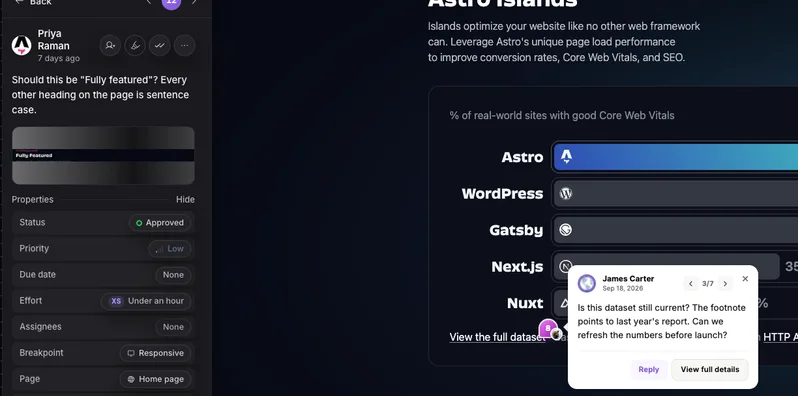
Pin it on the live page
Reviewers click any element on the real site and leave a comment. Nothing to install.
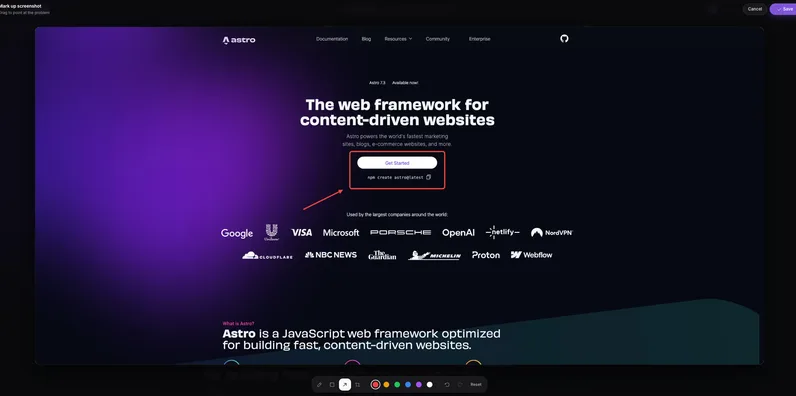
Draw and annotate
Mark up a screenshot with arrows and shapes so the change is obvious.
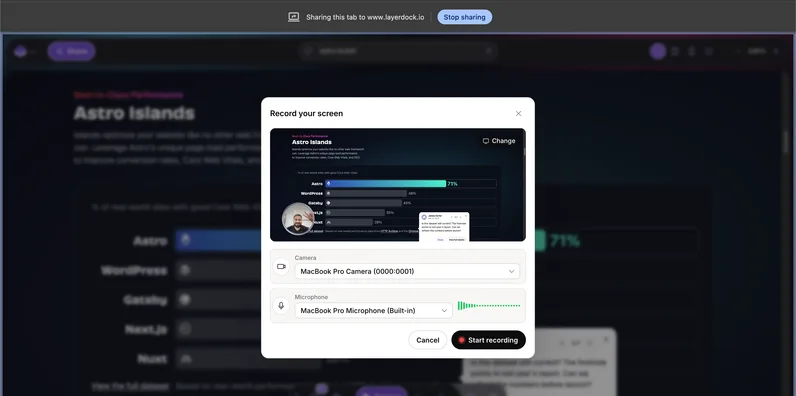
Record the problem
Screen recordings attach to the pin, so nobody has to explain it twice.
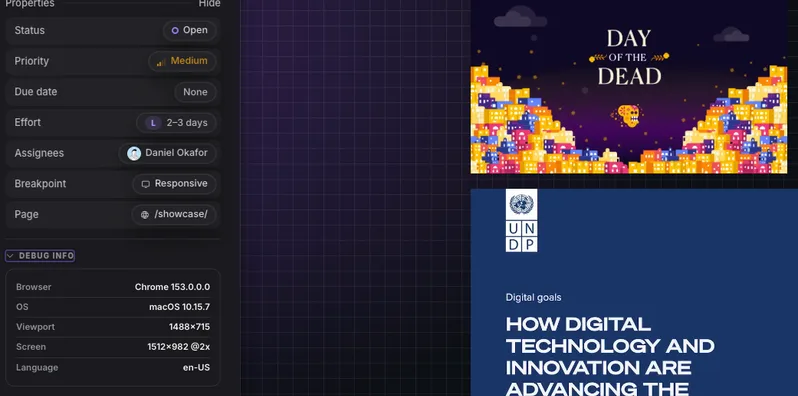
Console and network context
Every pin carries the errors and failed requests behind it for your developers.
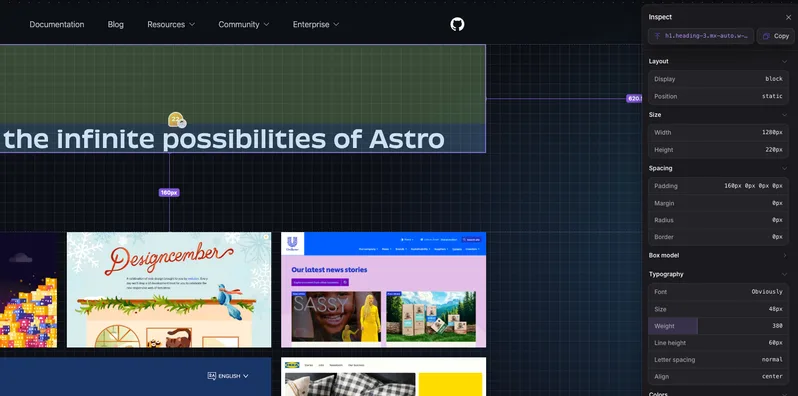
Inspect the element
See the exact element, its styles and its accessibility details from the pin.
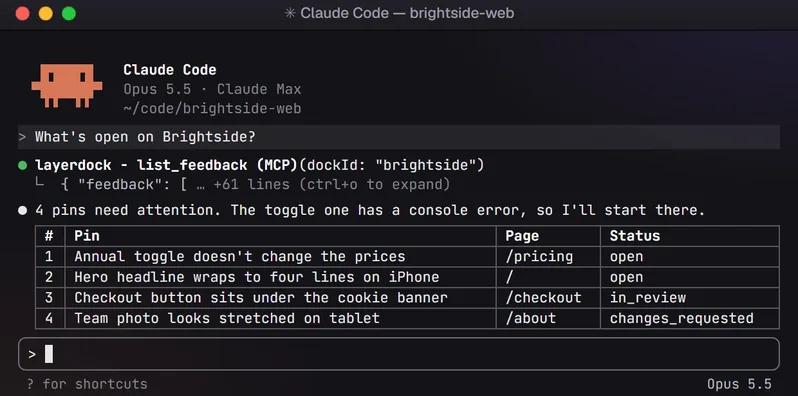
Hand it to your AI agent
Connect over MCP so your coding agent reads the feedback and fixes it.
How it works
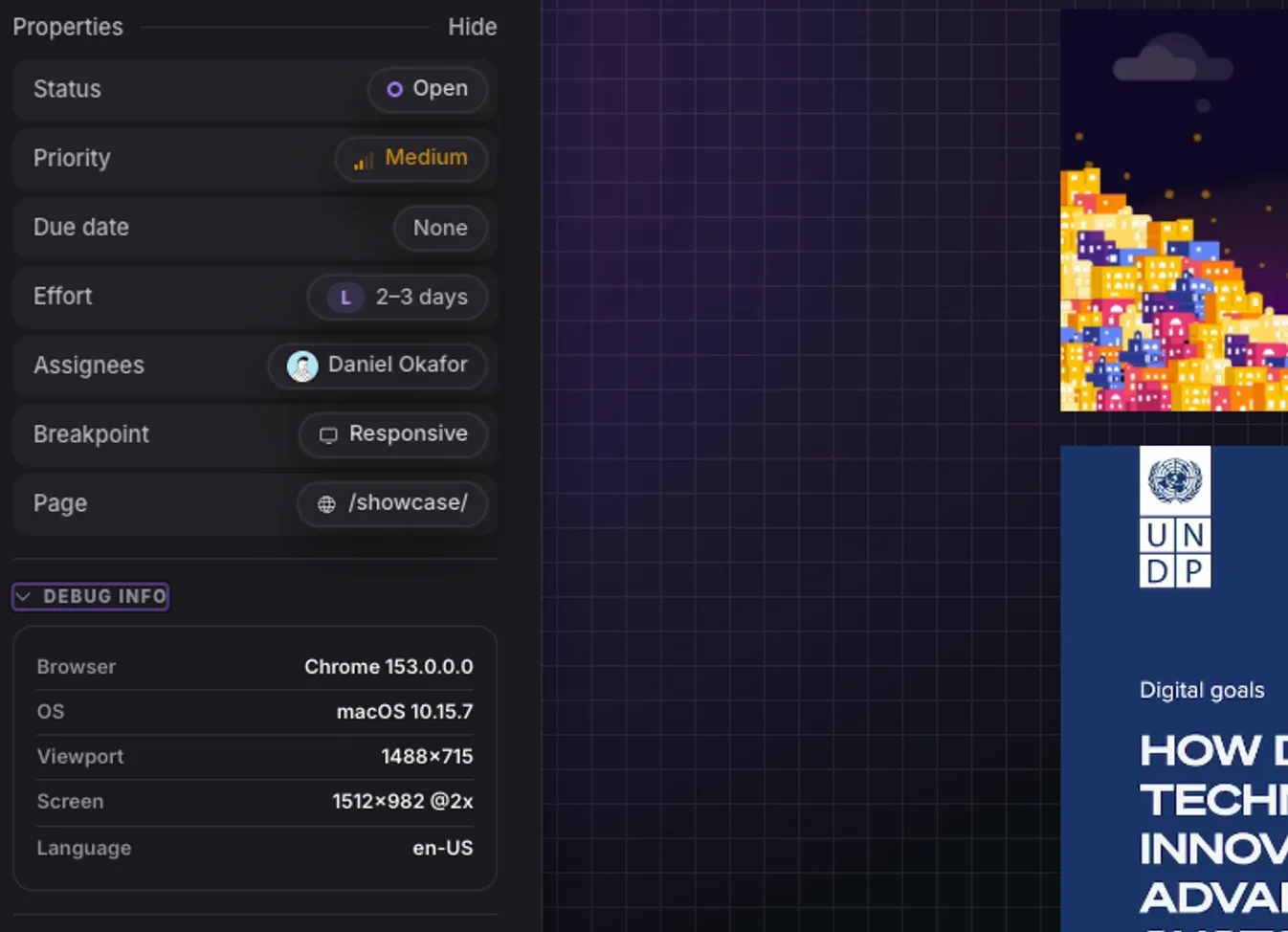
1. Capture
Paste your site URL into a dock.
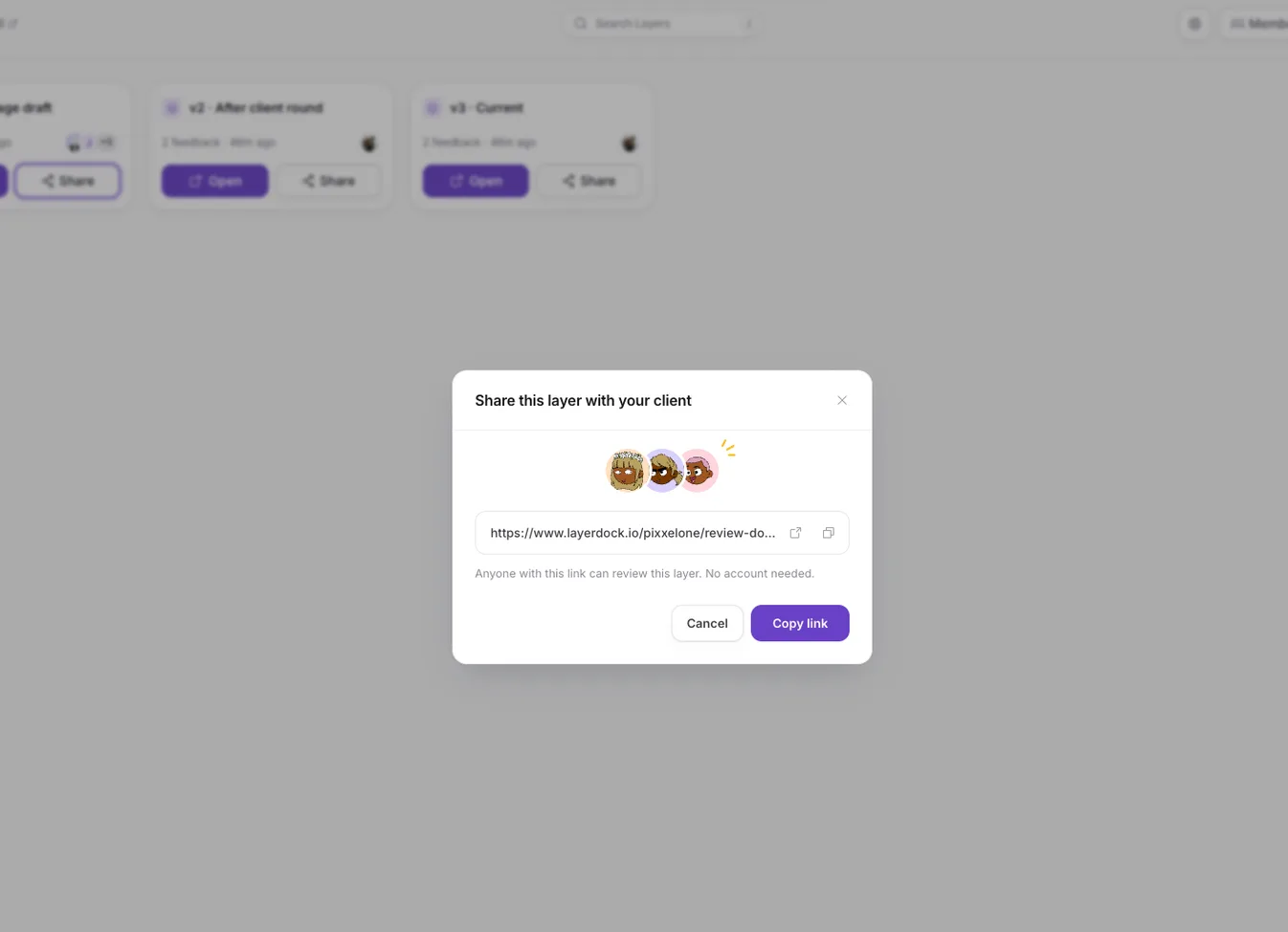
2. Share
Send the link. Clients need no account.

3. See
Every pin lands in one place, with context.
Free website feedback tools
You do not need to pay to start. These 8 tools have a permanent free plan rather than a trial that expires:
- Ybug — 1 member, 1 project, 50 screenshots a month
- Jam.dev — 30 captures and 5 recording links a month
- Ruttl — 5 users, 1 project, 5 pages
- Layerdock — Free forever, no card
- Pastel — 1 user, 1 active canvas
- Userback — 2 seats, 2 projects, 7-day retention
- Bird Eats Bug — 15 uploads a month
- Atarim — 200 one-time credits, 1 site
SureFeedback, Marker.io, PageProofer, Feedbucket, BugHerd, MarkUp.io, zipBoard, Usersnap offer a free trial but no permanent free tier. Free plans are fine for validating a workflow on one real project; the limits (seats, projects or monthly volume) are what you hit first on an agency’s second client. Microsoft Clarity is free without limits, but it is an analytics tool, not a way for a reviewer to leave feedback.
Browser extension, widget or hosted link?
How a tool reaches the page decides who can use it, on which sites, and on which devices. There is no universally right answer — each method trades one kind of friction for another.
| Method | How it works | Good at | Watch out for |
|---|---|---|---|
| Widget (script tag) | You paste a snippet into the site; a feedback button appears for every visitor | Nothing for reviewers to install; works on phones; works behind a login | Needs deploy access to every site you review; ships a third-party script |
| Browser extension | Each reviewer installs it once in Chrome, then reviews any site | Works on any site, including ones you cannot deploy to; no code on the site | One install per reviewer; does not run on mobile browsers |
| Hosted link (proxy) | The tool loads your URL inside its own page and you share that link | Zero setup for anyone; fastest to start | Can break JavaScript-heavy sites and usually cannot reach password-protected staging |
Ybug and Userback offer both a widget and an extension, which covers the most ground. Layerdock is a hosted link on purpose: agencies routinely review client sites they have no deploy access to, and a link asks nothing of the reviewer. Where a hosted link cannot reach — staging behind a password, a VPN or a login — it offers an optional one-line snippet instead. It is built for desktop browsers and reviews mobile and tablet widths from there rather than from a real phone.
Each method, step by step, is in how to annotate a website; for private staging specifically, see how to share a staging site with a client.
How to choose
Start with who is giving the feedback. If it is your own engineers and QA, Jam or Bird Eats Bug will serve you better than anything else here and cost less. If it is a client or a non-technical stakeholder, they are the wrong shape entirely and you want the live-site group.
Then check deploy access. If you cannot ship a script tag to the site under review — a client’s live production site, someone else’s staging environment — the widget-based tools (Marker.io, Feedbucket) are out before price enters the conversation. Extension-based tools work anywhere, and hosted-link tools such as Layerdock work on any publicly reachable site.
Then ask who reproduces the bug. If developers routinely lose time reproducing vague reports, console and network capture on every pin is worth more than any other feature here, and it narrows the field sharply. Ybug is the cheapest route to it at €23–29; Layerdock includes it at $59–69 and Marker.io at $149–199.
Then work out your real bill. Entry prices mislead badly in this category because the billing models differ. Per-user tools (Ruttl, Pastel Team) scale with your team; per-member tools with project caps (Ybug, Feedbucket) scale with both; per-workspace tools (Layerdock) do not scale with either. Every tool here gives external reviewers free, unlimited access — it is your own side you pay for.
Finally, check what you’re reviewing. If a meaningful share of your review cycles are PDFs, videos or design files rather than live pages, MarkUp.io or zipBoard will serve you better than a stronger website-specific tool.
Common mistakes when choosing a website feedback tool
- Buying an analytics tool for a review job. Heatmaps will not collect a client’s sign-off on a staging build. Match the tool to the stage.
- Ignoring the reviewer’s side. The tool your developers love is worthless if the client finds it confusing. Test it with a real client on a real deadline before committing the whole agency.
- Skipping technical context to save money. A cheaper plan without console or network capture often costs more in developer hours spent reproducing bugs than the upgrade would.
- Picking a widget tool for sites you do not control. If you cannot deploy to a client’s production site, you cannot collect feedback on it with a script tag.
- Comparing entry prices instead of your bill. Price the plan for your actual team size and project count, not the headline number.
- Letting feedback live outside your tracker. If reports do not flow into Jira, Linear, GitHub or Slack, they get lost between the review and the fix.
A tool decides where feedback lands, not whether it is any good. For that half, see how to give website feedback developers can act on and a website review process that gets to sign-off.
Try one of these on your own site
Paste your site and get a review link you can send to a client today. No account, nothing for them to install.
Free forever, no card. Clients just open the link, nothing to install.
Frequently asked questions
What is a website feedback tool?
A website feedback tool lets reviewers leave comments pinned directly to elements on a live web page, instead of describing problems in an email or a spreadsheet. The tool captures the element, the page and usually a screenshot automatically, turning a vague description into a structured ticket a developer can act on.
What is the best website feedback tool?
There is no single best one; it depends on who gives the feedback. For client review of live websites, BugHerd, Marker.io, Layerdock, Feedbucket and Pastel are the main contenders. Ybug is the cheapest route to console and network logs. For internal developer bug reports Jam.dev is the strongest. For feedback from a product’s end users, Userback. For PDFs and video as well as sites, MarkUp.io.
What is the cheapest website feedback tool?
Of the 17 tools compared here, Ybug has the lowest paid entry price at €13/mo for 3 members, followed by Jam.dev at $14 per creator per month billed yearly and Ruttl at $18 per user per month. Layerdock is $19/mo, SureFeedback $25, Pastel $35, Marker.io (billed annually), Userback and PageProofer $39, Feedbucket $49, BugHerd and Bird Eats Bug $50. Several also have permanent free plans. Per-seat and per-workspace pricing are not directly comparable, so the cheapest option depends on your team size. Prices verified 21 September 2026.
Are there free website feedback tools?
Yes. Ybug, Jam.dev, Ruttl, Layerdock, Pastel, Userback, Bird Eats Bug, Atarim all have a permanent free plan, with limits on seats, projects or monthly volume. The others offer a time-limited trial only. Microsoft Clarity and Hotjar are free too, but they are visitor analytics tools, not tools for a reviewer to pin feedback on a page.
Do clients need an account to leave feedback?
On every live-site tool compared here, no. Reviewers comment through a share link or widget without registering, and most vendors make client reviewers unlimited and free on every tier. This is the single most important practical feature in the category, because client adoption collapses the moment you ask someone to set a password.
What is the difference between a browser extension and a widget?
A widget is a script tag you install on the site itself, so it only works on sites you can deploy code to, but it needs nothing from the reviewer. An extension installs in the reviewer’s browser instead, so it works on any site including ones you have no deploy access to, at the cost of a one-time install by each reviewer. Jam uses an extension; Marker.io and Feedbucket use widgets; Ybug and Userback offer both. Layerdock is a hosted link, which needs neither on a public site, with an optional snippet for private staging.
Can reviewers leave feedback from a phone?
Only with a widget or a hosted-link tool. Desktop browser extensions do not run in mobile browsers, so extension-only tools cannot take feedback from a real phone. Layerdock is a hosted-link tool built for desktop browsers; it reviews a site at mobile and tablet widths from a desktop instead. If on-device review matters, choose a widget tool such as Marker.io, Feedbucket, Ybug or Userback.
Which website feedback tool captures console errors?
Ybug records a limited console log on its €13 Basic plan and full console and network logs from its €29 Startup plan, the cheapest way to get them in the live-site group. Layerdock captures them on every pin but shows them on its Agency plan ($69/mo, or $59/mo billed yearly). Jam.dev and Bird Eats Bug capture them thoroughly but are built for developer bug reporting rather than client review. Marker.io captures them on its Team plan at $149/mo annually ($199 monthly). BugHerd attaches browser and OS metadata but not full console output. Pastel, MarkUp.io and zipBoard do not capture them.
Is Hotjar a website feedback tool?
Not in the sense this page means. Hotjar and Microsoft Clarity are visitor analytics tools: heatmaps and session recordings that show how anonymous visitors behave on a live site. They cannot let a client pin a comment on a broken button during a build. Most teams that need both run one of each.
What is the best website feedback tool for agencies?
For agencies specifically, the shortlist is BugHerd if you want a built-in task board and can absorb $50/mo, Feedbucket if you want a focused agency tool and have deploy access, and Layerdock if you review sites you cannot install a script on, want console and network capture on every pin, and would rather pay per workspace than per seat. Pastel is the better choice for a solo freelancer, and Atarim if your work is predominantly WordPress.
Review the live site, with nothing to install
Paste a URL, share the link, and your client pins comments on the real page. Plans start free.
Head-to-head comparisons
For a deeper look at the four tools Layerdock is most often evaluated beside, each with a full feature table and the cases where the other product is the better buy: vs BugHerd, vs Marker.io, vs MarkUp.io and vs Userback.
Replacing one specific tool?
These shortlists each cover one tool people commonly move away from, why they move, and where that tool is still the right answer — drawn from the same verified prices as the table above: BugHerd alternatives, Marker.io alternatives, MarkUp.io alternatives, Userback alternatives, Huddlekit alternatives, Ybug alternatives, Ruttl alternatives, Jam.dev alternatives, Pastel alternatives, SureFeedback alternatives, Feedbucket alternatives, PageProofer alternatives, Bird Eats Bug alternatives, Atarim alternatives, zipBoard alternatives and Usersnap alternatives.
Choosing by job or by budget?
Two narrower guides sit beside this list: the best client feedback tools for web development projects sorts the same tools by the job they do, and website feedback tool pricing compared works out what each costs for a freelancer, a three-person agency and a twelve-person team. If you need a coding agent to fix the feedback, see the visual feedback tools for Claude Code and Cursor (MCP), and on a tight budget, the cheap tools where clients need no account.
See what a dock is, read how to collect client feedback on a website, compare tools for agencies and QA testing, or go to pricing.